



MacroPoint for Truckers is a work-focused navigation app from Descartes Intl. that I would look at very differently from a normal driving map. It is built around keeping partners informed about a trip, not simply helping me find a faster road. In my experience, that distinction matters: a truck driver, dispatcher, broker, or logistics team may care just as much about dependable arrival and departure communication as the route itself.
The app is free, rated for Everyone, and belongs to the Maps & Navigation category. It has passed the point of being an obscure specialist tool, with over 1 million installs and a 4.5 average from around 72 thousand ratings. Those figures do not automatically make it right for every driver, but they do suggest that the basic idea has found a substantial audience.
What the app is really doing during a trip
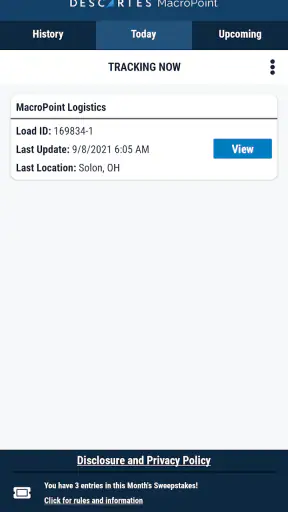
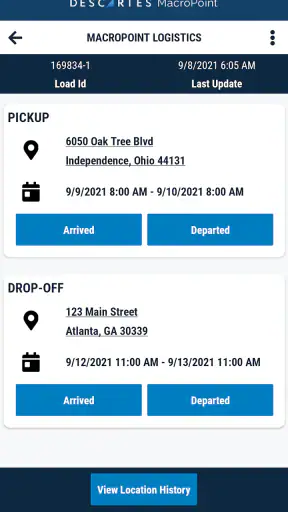
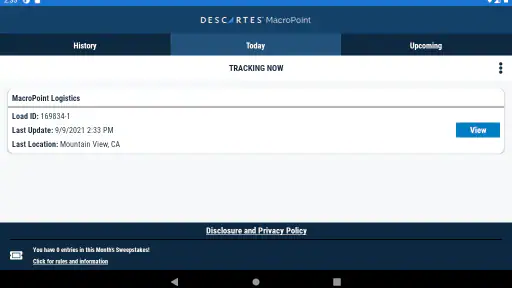
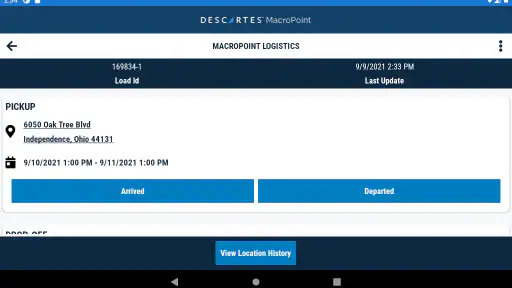
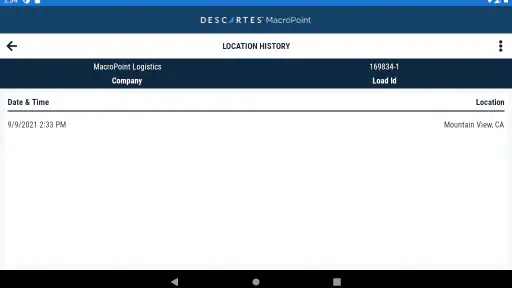
The central experience is communication around a shipment. MacroPoint automatically communicates arrival, departure, and location to partners, so the useful result is less manual status reporting while I am moving. Instead of repeatedly stopping to tell someone that I have reached a facility or left a pickup, the app is intended to make those moments visible to the people following the load.
That makes it a different kind of tool from Google Maps, Apple Maps, or a dedicated truck-routing application. Those alternatives are primarily concerned with where I should drive. MacroPoint for Truckers is concerned with what others need to know about the movement of the load. I would not install it expecting a complete replacement for a truck-specific route planner, because communication and route calculation are separate jobs.
The distinction is especially important for drivers who already have a preferred navigation setup. I can imagine using a familiar mapping app for roads, clearances, traffic, and directions while using MacroPoint as the visibility layer for the trip. That combination may be more practical than forcing one app to handle every part of the workflow.
The strongest value is reducing status-check friction while I am working. A driver should not have to treat every phone call or message as a separate task during a busy day. When the app handles the communication expected by partners, it can make the trip feel more organized and reduce the number of interruptions competing for attention.
Why the network matters more than it first appears
Connectivity shapes this app in a very direct way. Location and trip events are useful because they can reach the people who need them at the right time. In a city with a strong mobile signal, that relationship can feel almost invisible: I move, an event occurs, and the relevant partner receives a more timely picture of the load.
The experience changes on long highway stretches, at remote facilities, in underground loading areas, or anywhere the phone struggles to communicate. I would not treat MacroPoint as a tool that makes connectivity problems disappear. If the phone cannot reliably send information, the practical benefit of automatic communication may be delayed or interrupted. That is not a reason to dismiss the app, but it is a reason to keep a backup habit for important updates.
My advice would be to avoid assuming that a quiet screen means every partner has received the latest event immediately. Before depending on the app for a sensitive appointment, I would check that the phone has a usable connection and that the trip is being handled as expected. A quick manual confirmation can be worthwhile when the load is time-critical or the driver has just left a poor-coverage area.
This is also why I see MacroPoint as a companion to normal operating procedures rather than a total replacement for them. The app can reduce routine communication, but it should not encourage a driver to ignore a direct request from a dispatcher or broker. Automation is most helpful when it removes repetitive work, not when it becomes an excuse to stop checking the wider situation.
Using it from the cab without creating a distraction
A mobile workflow succeeds only when it fits the realities of driving. The best use of MacroPoint is prepared before the vehicle moves: make sure the relevant trip is ready, understand what communication is expected, and avoid trying to solve setup problems while handling traffic. Once the trip is underway, the less attention I need to give the phone, the better.
That makes the app appealing for drivers who spend much of the day moving between pickup and delivery points. A driver may leave a facility, enter a busy industrial road, stop for a required break, and arrive at another gate without wanting to type a sequence of updates. Automatic communication is designed for exactly that kind of repetitive movement.
A realistic example would be a morning pickup at a distribution center. I arrive at the yard, deal with the gate process, and prepare to leave with the load. Instead of composing a message while navigating the exit, MacroPoint can serve as the channel for communicating the relevant arrival, departure, and location information to partners. Later, if traffic or a facility delay changes the rhythm of the trip, the people monitoring the load have a better basis for understanding where it is.
There is a human side to this as well. Drivers often work with several parties who each want visibility, while the driver has the least time to answer repeated questions. A communication-focused app can protect some of that attention. It does not remove all calls or messages, but it can make routine location questions less disruptive.
Still, I would not use it as my only source of navigation guidance. MacroPoint’s purpose is tied to shipment visibility, whereas a truck driver may need road restrictions, vehicle dimensions, fuel planning, or detailed directions. If those are central to the job, a specialist truck-navigation app remains the better tool for that part of the day.
Where the mobile context creates friction
Truck work does not happen in one consistent environment. A phone may be mounted in the cab, carried into a warehouse, left in a pocket during a yard inspection, or handled briefly at a gate. Each setting creates a different risk of missed attention. I would keep the device positioned so that the app can do its communication work without requiring constant handling.
Battery and signal awareness also become practical habits. I would begin a long run with the phone charged, avoid unnecessary app switching, and pay attention after entering a building or yard where reception may be weaker. These are not glamorous features, but they determine whether a connectivity-dependent workflow feels dependable in daily use.
Another useful habit is checking the trip context at natural pauses rather than repeatedly looking at the screen. A stop at a safe parking area, a completed check-in, or the end of a facility visit is a sensible moment to confirm that everything is progressing normally. Checking while driving undermines the very safety and efficiency the app is meant to support.
For a small carrier or independent driver, this may be enough structure to make the app worthwhile. For a larger operation, the value depends more on how consistently everyone follows the same process. If one driver relies on automatic events, another sends manual messages, and a third uses a different tracking method, partners may still receive an uneven picture of the fleet.
What happens when communication is delayed
The most important limitation is not that the app has no purpose without a perfect connection; it is that time-sensitive communication becomes less predictable when the mobile environment is unstable. A delayed location or event can create confusion if someone is expecting an immediate update. I would plan around that possibility rather than treating automation as infallible.
My recovery approach would be simple. Once I reach a reliable connection and a safe stopping point, I would check the current trip status and contact the relevant partner directly if an important milestone may have been missed. That extra step is particularly sensible after leaving a remote road, a large warehouse, or a facility with poor indoor reception.
I would also be cautious when changing phones, reinstalling the app, or moving between work and personal devices. Any app used for shipment visibility deserves a quick pre-trip check after a device change. The goal is not to spend the whole day monitoring it; the goal is to discover setup problems before the truck is already on the road.
Another recovery situation is a disagreement between the app’s apparent status and what actually happened. A gate may record an arrival before the driver reaches the loading position, or a stop may last longer than expected. Automated communication can provide useful evidence of movement, but it does not understand every operational detail at a facility. I would still explain unusual delays in plain language when the distinction matters.
This is where human judgment remains valuable. The app can communicate movement, but a dispatcher or broker may need context: a closed entrance, a queue inside the yard, a paperwork issue, or a changed appointment. MacroPoint helps with the basic visibility layer; it does not replace the conversation required to explain exceptions.
Keeping data use sensible on the road
Because the experience depends on location communication, I would treat mobile data as part of the operating plan. The app is not something I would casually leave unexplained on a personal phone if I am concerned about data usage or battery. I would review my phone’s normal data controls, understand which connection I am using, and check usage periodically during the first few trips.
That does not mean I would avoid the app. Its purpose is tied to sharing movement with partners, so communication is the point rather than an incidental extra. The sensible approach is to use it deliberately: start the correct trip, keep the phone in a stable working setup, and avoid running unnecessary mapping or media services at the same time when they are not needed.
Drivers who use a personal device may also want to separate work routines from private phone habits. Keeping the device charged, limiting background clutter, and checking the app only at safe moments can make the experience feel more controlled. For company-managed phones, the decision may be easier because the device and connectivity are already part of the work arrangement.
Privacy is another practical consideration whenever a phone communicates location to business partners. I would want to understand which trip is active and who is supposed to receive visibility before starting a run. That is especially important when using the same device for personal travel. A work-focused tracking session should be treated as a deliberate operational action, not something to leave running without thought.
The free price makes trying the app less financially risky, but “free” does not remove the need to evaluate the wider cost of the workflow. Mobile data, battery, setup time, and partner expectations all matter. For a driver whose customers already use MacroPoint, those costs may be small compared with the time saved. For someone who rarely needs shipment visibility, another method may be simpler.
Who will benefit most from MacroPoint
I think the app makes the most sense for truckers whose work involves regular communication with brokers, dispatchers, shippers, or receivers. It is particularly useful when several people need a current view of a load and the driver does not want to send repetitive arrival, departure, and location messages manually.
It can also suit drivers who prefer a low-interaction workflow. Once the trip is properly prepared, the appeal is that routine communication can happen around the movement of the vehicle rather than requiring a separate message for every ordinary milestone. That can be valuable during a day filled with gates, inspections, loading appointments, and changing road conditions.
Independent operators may appreciate the professional impression created by consistent visibility, especially when they handle multiple loads or work with partners who expect regular updates. A larger fleet may benefit even more if the same process is adopted across many drivers. In both cases, the app’s usefulness depends on the people on the other end actually using the information.
I would be more hesitant to recommend it to someone who only wants turn-by-turn directions, offline map access, or truck-specific routing. Those needs point toward a different category of app. I would also hesitate if a driver’s work rarely involves external shipment tracking, because adding a communication layer without a real operational need may create more setup than value.
It may not be the best fit for a driver who dislikes location sharing altogether or who cannot keep a phone reliably connected during work. The app’s core benefit comes from visibility, so users should be comfortable with that basic exchange. If the business arrangement does not require partners to see trip movement, a simpler manual process may be enough.
How it compares with familiar alternatives
Compared with Google Maps or Apple Maps, MacroPoint is not primarily a destination-finding tool. Those familiar apps are convenient for general directions and everyday navigation, while MacroPoint addresses the communication needs surrounding a commercial trip. I would use the familiar map when I need directions and the logistics app when partners need shipment visibility.
Compared with a truck-specific navigation app, the difference is even clearer. Truck-routing tools are designed around the vehicle and the road: restrictions, suitable routes, and driving guidance. MacroPoint’s strength is the operational timeline around the load. Choosing between them is not always necessary; in many workflows, they solve different problems and work better side by side.
Compared with phone calls, texts, or repeated manual check-ins, MacroPoint offers a more structured approach to routine visibility. Manual communication still wins when something unusual needs explanation or when connectivity has interrupted the normal flow. I see the app as a way to reduce repetitive updates, not as a universal replacement for direct contact.
That trade-off is important. Automation saves attention when events are ordinary, but human messages carry more meaning when a shipment is delayed, a facility changes instructions, or a customer needs reassurance. The best workflow uses MacroPoint for the predictable parts and direct communication for the exceptions.
Version, compatibility, and everyday readiness
The current version is 26.06.24, and the app requires Android 6.0 or later. That gives it a broad reach across Android phones, including devices that are not especially new. I would still test it on the actual phone used in the cab rather than assuming that operating-system compatibility alone guarantees a comfortable experience.
Descartes Intl. is the developer behind the app, and the long-running presence of MacroPoint in this category is reassuring for users looking for a purpose-built logistics workflow rather than a general-purpose map. It was released on April 16, 2013, so this is not a newly assembled experiment aimed at a passing trend. The important question is still whether it matches the communication process used by a particular carrier or partner.
Since the app is free and rated for Everyone, trying it is relatively straightforward from an access point of view. I would begin with a low-risk trip or a noncritical workflow, confirm how arrival and departure communication behaves, and ask the partner receiving the updates whether the information is appearing as expected. That small trial can reveal more than simply installing the app and assuming it is ready.
My practical setup checklist would be short:
- Prepare the trip before driving rather than during a busy road segment.
- Keep the phone charged and positioned safely in the cab.
- Check connectivity after leaving a poor-signal area.
- Use a safe stop to investigate an unexpected status.
- Keep direct contact available for delays and exceptions.
These steps are not substitutes for the app; they are what make a connectivity-based tool more dependable in real conditions. They also prevent a common mistake: blaming the app for a communication problem that actually came from an unprepared phone, weak coverage, or an unusual facility process.
My connectivity verdict
After looking at MacroPoint as a working tool rather than a standard map, I find its purpose clear and useful. It is strongest when a driver needs partners to follow the progress of a load without turning every routine milestone into a manual phone call. The automatic communication around arrival, departure, and location gives the app a focused role in a trucker’s mobile workflow.
Its main weakness is equally clear: the experience depends on a functioning mobile connection and on partners interpreting automated information in the right context. Remote roads, indoor facilities, device changes, and unusual delays can all require human follow-up. I would never let the convenience of automation replace safe driving, a sensible backup habit, or a direct explanation when something goes wrong.
My recommendation is positive for drivers who need shipment visibility, but conditional for anyone searching for navigation alone. Use a truck-routing or general map app for directions, and let MacroPoint handle the communication layer when your work requires it. If that division matches your daily routine, this free app can remove a surprisingly annoying amount of repetitive status work. If it does not, its connectivity demands may feel like unnecessary overhead.
Overall, MacroPoint for Truckers earns its place as a practical logistics companion rather than an all-purpose driving assistant. I would recommend testing it with the people who receive the updates, using it first on a manageable trip, and keeping a clear recovery plan for weak signal or unusual events. With those expectations, it can make the road-to-dispatch connection smoother without pretending that every part of trucking can be automated.


